LastPass Password Manager
- 3.8
- Rating
- 10.00M
- Installs
- Free
- Price

 Analysis by App-foxy
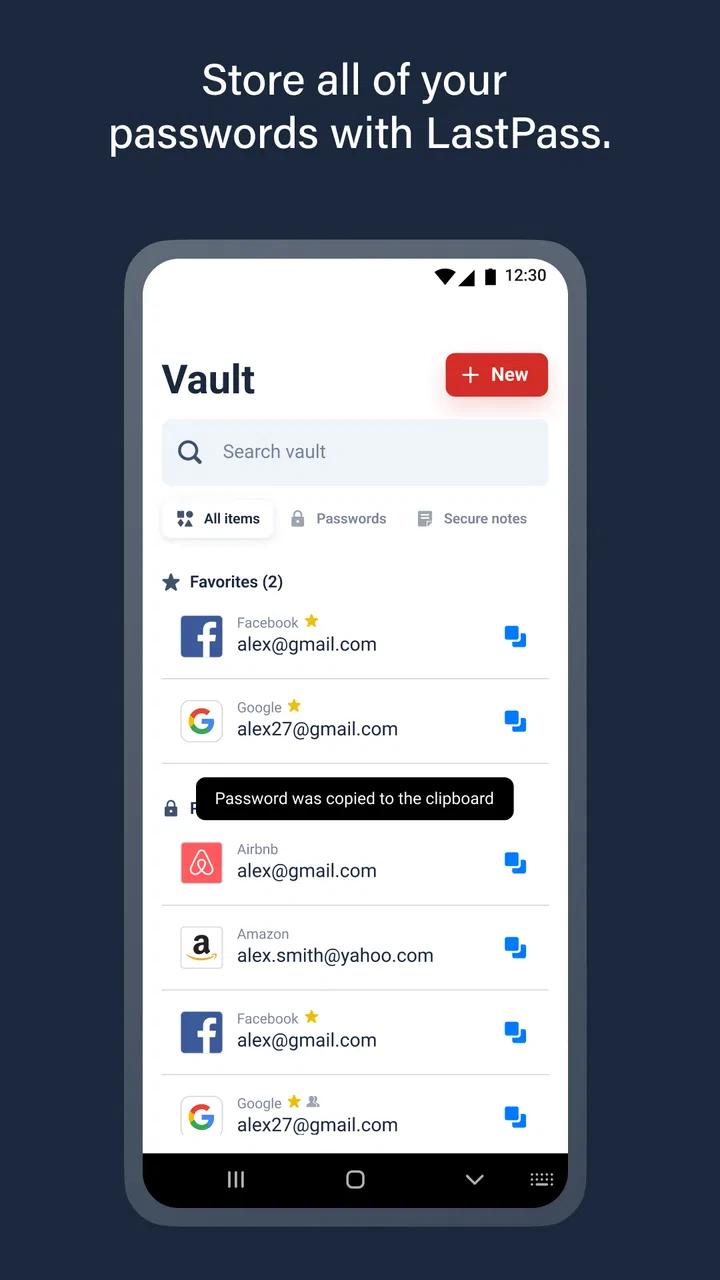
I noticed the appeal of LastPass Password Manager almost immediately: it gives all those scattered passwords a single place to live, then tries to make signing in feel less like a chore. I tested it as a productivity app rather than treating it as a simple vault, because its real value appears in the small moments when I need an account quickly, create a new login, or return to a service I have not used for weeks. The first impression is convenient, but the more important question is whether that convenience survives after the novelty disappears.
My short answer is that it can earn a permanent place on an Android or iOS device, especially for someone who regularly reuses passwords or manages many accounts. It is free to start, aimed at an Everyone audience, and developed by LastPass US LP. The app has a 3.8 average from around 236 thousand ratings, with more than 10 million installs, so it is clearly a familiar name in the productivity space. Still, familiarity is not the same as effortless long-term use. The experience depends heavily on whether you are willing to build a habit around one central password vault.
Why the first week feels useful
The strongest early benefit is mental relief. Instead of trying to remember which variation of a password belongs to a particular website, I can use the vault as the place where that information is organized. That changes the task from “remember everything” to “protect and access one system properly.” For a busy phone user, that is a meaningful improvement, not just a cosmetic feature.
You May Also Like

 Blood Strike: 2.5 Anniversary
Blood Strike’s Loadouts Turn Every Drop Into a Tactical Gamble
A close look at Blood Strike’s custom loadouts: how fast access to signature weapons reshapes its battle royale rhythm, rewards preparation, and narrows the gap between fights.

 Pandora - Music & Podcasts
Pandora’s Music Is Easy to Start, but Harder to Recover
Pandora’s strength is its low-effort path from a seed to a station. Its weak spot is how much confidence it asks you to place in connection, setup, and quiet recovery.

 8 Ball Pool
 Is Built on Rivalries, Rematches, and Routine
A close look at the rivalries, rematches, shared routines, and unanswered safety questions that turn a quick pool match into a persistent mobile community.

 Samsung Music
’s Quiet Strength Is Playing What You Already Own
Its reach comes less from spectacle than from dependable access to a personal library. That simplicity is both the app’s strongest retention engine and its ceiling.

 AccuWeather: Weather Radar
AccuWeather Review: A Quick, Clear Forecast for Everyday Decisions
For everyday plans, the best forecast is the one you can understand quickly. AccuWeather makes rain timing, radar, and local conditions easy to act on, with a few trade-offs.

 Hill Climb Racing
Why Hill Climb Racing Still Turns Crashes Into One More Run
A tiny car, a bumpy hill and one more upgrade: Hill Climb Racing keeps resurfacing because its simple chaos makes every near-miss feel personal.
More From Our News Desk
View All News


I found the app most useful during account creation. When I sign up for a service, the important step is not only saving the login afterward; it is avoiding the temptation to invent another familiar password. A password manager makes it easier to treat each account as separate. That is particularly helpful for shopping, travel, school, work tools, and subscriptions, where forgotten credentials often interrupt an otherwise quick task.
The first-week experience also depends on how much cleanup you are prepared to do. If your existing passwords are already scattered across browser storage, notes, messages, and memory, moving to a vault can feel like an administrative project. I would not try to organize every account in one sitting. I would begin with email, banking, cloud storage, and the accounts used most often, then add the rest as I log in. That approach makes the change feel practical instead of overwhelming.
LastPass Password Manager is free to download, although it includes in-app purchases ranging from $0.99 to $35.99 per item. That makes it accessible for someone who wants to try the basic workflow before deciding whether the wider offering fits their needs. I would pay attention to the exact plan options shown in the app rather than assuming every feature belongs to the free experience. The important point is that the initial trial does not require an immediate purchase.
On a phone, a password manager has to fit into the rhythm of signing in. If it adds too many steps, I will eventually ignore it and return to whatever method feels fastest. LastPass is at its best when I use it consistently for new accounts from the beginning. Saving a login at the moment I create it prevents the later question of whether the vault contains an old or incomplete version.
A realistic example is a Sunday evening when I need to access a utility account, a delivery service, and a work portal from the same phone. Without a system, I might search through notes, reset one password, and postpone another login. With the vault maintained, the process becomes much more predictable. The time saved is not dramatic in one session, but the reduction in interruptions adds up over a month.
The habit that makes the app worthwhile
The most useful habit is simple: never create a new login outside the vault unless there is a clear reason. If I make a password in a browser, then forget to save it, the manager cannot repair that gap later. I also check that the username is correct, because a saved password is not helpful if it is attached to an old email address or an alternate account.
Another practical habit is to use descriptive names for entries. “Account” is not enough when several services use the same email address. Naming an entry after the actual service makes searching faster and reduces the chance of opening the wrong record. This sounds minor, but it becomes important once the vault grows beyond the handful of accounts most people remember easily.
I would also treat the master password as a serious daily decision. It needs to be memorable enough to use without panic, but strong enough to protect the vault if the device is lost or someone gains access to it. Writing it in an exposed note defeats the purpose of moving passwords into a manager. The app can simplify credential storage, but it cannot remove the responsibility of protecting the main entry point.
What remains valuable after the first month
After the initial setup, the app’s value becomes quieter. I no longer notice it every time I sign in, which is actually a good sign. The benefit is not entertainment or constant discovery; it is the dependable removal of small obstacles. I can open an account without reconstructing an old password from memory, and I am less likely to use the same credential everywhere simply because I am tired.
This recurring value is strongest for people with many accounts. Freelancers, students, parents managing household services, and anyone who regularly switches between personal and work logins can benefit from a central record. The app is also useful for people who do not consider themselves organized. A vault gives those accounts a defined home, even if the rest of the user’s digital life is messy.
Compared with saving passwords only in a browser, a dedicated manager feels more deliberate. Browser storage is convenient when I stay inside one browser and one device, but it can become less comfortable when I move between platforms or need to think about credentials separately from browsing history. LastPass is designed around the vault itself, so the mental model is clearer: accounts belong in the manager, not merely in whichever browser happened to save them.
Compared with writing passwords in a notebook or phone note, the advantage is organization and reduced exposure through casual searching. A note can be quick to edit, but it tends to mix sensitive information with unrelated text and offers little structure as the list grows. I would choose the manager for anyone who has already lost track of where credentials are stored. A notebook may still suit someone with very few accounts and a carefully controlled private environment, but it becomes awkward as online life expands.
The comparison with built-in device password tools is more nuanced. Those tools can feel smoother because they are already integrated into the operating system and familiar sign-in prompts. If I use one platform exclusively and want the fewest decisions, the built-in option may be enough. LastPass becomes more appealing when I want a separate vault and a workflow that is not tied entirely to one device ecosystem. The trade-off is that a separate service asks me to maintain another important account and learn its own routine.
There is also value in the app as a memory aid during infrequent logins. I may not visit an insurance portal, an old school account, or a specialist service for months. When I return, the stored entry prevents that account from becoming a reset-password project. This is one of the less obvious reasons to keep using a manager: its usefulness is often greatest when memory is least reliable.
Where long-term maintenance enters the picture
A password vault is not a set-and-forget drawer. I need to update entries when an email address changes, remove accounts that are closed, and correct duplicates. If I allow several versions of the same login to accumulate, the convenience starts to fade because I have to guess which record is current. I recommend editing an entry immediately after a password change instead of telling myself I will clean it up later.
That maintenance burden is small when handled regularly, but unpleasant when postponed. A person with hundreds of old accounts may face a long cleanup period before the vault feels trustworthy. I would not interpret that effort as a flaw unique to LastPass; it is the unavoidable cost of turning years of improvised credential storage into a reliable system. Still, it matters when deciding whether the app fits your personality. If you dislike reviewing digital records, the initial organization may feel like work rather than relief.
One useful workflow is to divide accounts by importance. I would first verify the entries that protect other accounts, such as the main email address, then review financial, work, and communication services. Low-priority accounts can wait until they are needed. This reduces the risk of spending an evening on accounts that may never be opened again while leaving the most important records uncertain.
I also prefer to inspect a saved login before using it when a service has multiple profiles. A personal account and a work account may share a service name but use different usernames. Choosing by label alone can send me into the wrong profile or create a new password for the wrong record. Clear naming, accurate usernames, and occasional cleanup are more important than people expect.
The current version is 6.56.0.26547, and the app requires at least operating system version 12. That requirement is straightforward for users with a reasonably current phone, but it can matter if you are trying to keep an older device alive. Before planning a move to an old spare phone, I would check its operating system first. A password manager is not a good place for surprises during an urgent login.
What creates fatigue over time
The main source of fatigue is the centralization itself. Once many accounts depend on one vault, the master password and the access routine feel more important than any individual login. That is sensible from a security perspective, but it can make a forgotten master password feel especially stressful. I would only adopt this system if I am willing to respect that central responsibility.
There is also a behavioral friction that appears when an app, browser, or website does not cooperate with the expected sign-in flow. Even a well-organized vault cannot make every login identical. Some services use unusual fields, multi-step authentication, account selectors, or changing prompts. When automatic filling is not smooth, I may need to open the vault, find the entry, and copy the information manually. That is still better than guessing, but it is not always invisible.
Another fatigue point is the temptation to save everything without reviewing it. A vault can become a digital junk drawer if every temporary account, duplicate login, and abandoned registration is stored indefinitely. The manager then feels less like a trusted reference and more like a search problem. I get better results when I treat each saved entry as something I may need to understand later, not as a disposable capture.
The free starting point is helpful, but the presence of in-app purchases means I would examine the boundaries of the plan before building my entire routine around features I may not retain. This is especially important for someone choosing between LastPass and a built-in password tool that already covers their basic needs. The decision should be based on the workflow I will use every week, not on the excitement of having a new vault.
I would skip it if I have very few accounts, rarely sign in on mobile, and already use a reliable built-in solution that I understand. Adding another password system in that situation could create duplication rather than clarity. I would also hesitate if I am unwilling to maintain accurate entries. A neglected vault can give false confidence, which is worse than admitting that credentials are disorganized.
On the other hand, I would strongly consider it if I frequently reset passwords, share responsibility for household accounts, move between devices, or keep discovering that an old login is missing. Those are signs that memory and browser-only storage are no longer serving me. The app’s value grows with the number of accounts and the number of interruptions they create.
Practical questions I would settle before installing
Is it suitable for a beginner? Yes, provided the beginner starts small. I would not import or record every credential immediately. I would secure the main email account first, add a few frequently used services, and learn the search and editing routine. That creates a working habit before the vault becomes crowded.
Will it eliminate every password problem? No. It can reduce forgotten credentials and discourage reuse, but it cannot correct an account that was never saved, a username that changed, or a website with an awkward sign-in process. I still need to check entries and respond properly when a service changes its login requirements.
Should I use it instead of a device’s built-in password storage? That depends on how much separation and flexibility I want. A built-in tool may be the better choice for a single-platform user who values maximum simplicity. LastPass makes more sense to me when I want a dedicated password-management routine and am comfortable maintaining it as an independent part of my digital life.
Does the app suit family or shared-account situations automatically? I would not assume that a personal vault solves every sharing need. Household accounts often involve different levels of access and changing responsibilities, so I would first understand how the chosen plan handles the specific workflow. The safe approach is to avoid casually passing around the main vault credentials just because two people need the same service.
What should I do during the first week? I would create the vault, secure the main access details, add the most important accounts, and use the manager for every new login. At the end of the week, I would search for duplicates and fix unclear labels. That short review is more valuable than spending hours trying to perfect an entire password history before I have formed the habit.
My long-term verdict
LastPass Password Manager earns lasting space when it becomes part of the way I create and retrieve accounts, rather than an app I open only after forgetting a password. Its recurring value is practical: fewer interruptions, less reliance on memory, and a clearer home for credentials. The first-week appeal is easy to understand, but the month-to-month benefit comes from consistency.
I do not see it as a magic solution or a product everyone needs. The central vault creates responsibility, the records need occasional maintenance, and some sign-ins may still require manual effort. Users who already have a smooth built-in password workflow may gain little by adding another layer. People with a growing collection of accounts, however, are likely to notice the difference more clearly.
My recommendation is to approach it as a habit-building tool. Start with important accounts, label entries carefully, update them immediately after changes, and review the vault before it becomes cluttered. If that routine sounds manageable, the free starting point makes it reasonable to try, while the Everyone content rating keeps it broadly approachable. If I wanted a password manager that I could install and then completely ignore, I would not choose this category at all; its benefits depend on participation.
After the novelty fades, the app is judged by whether I still trust it to be the first place I look. In my experience, it can pass that test for the right user. The lasting advantage is not storing passwords once; it is making secure, organized access the default response every time a new account appears.
FAQs for LastPass Password Manager
01What is LastPass Password Manager, and how does it work?
LastPass Password Manager is an app designed to store and organize passwords, payment details, secure notes, addresses, and other sensitive information in an encrypted vault. After creating a master password, you can use LastPass to generate strong passwords, save login credentials, and fill them automatically in supported browsers and apps. The vault is protected by your master password, so choosing a strong, memorable password is essential.
02Is LastPass Password Manager safe to use?
LastPass uses encryption and security features intended to protect the information stored in your vault, and your master password is not supposed to be available to LastPass in readable form. However, no online service is completely immune to security incidents, and LastPass has experienced widely reported breaches and security concerns in the past. Users should enable available multifactor authentication, use a unique master password, keep the app updated, and monitor their accounts regularly.
03Can I use LastPass on both Android and iPhone?
Yes, LastPass is available for Android and iOS, and it can also work with supported desktop browsers and computers. Your encrypted vault can synchronize across devices when you sign in with the same account and use a compatible subscription or plan. Before downloading, check the current app requirements, supported browsers, and account limitations, since features and synchronization options may change over time.
04Does LastPass offer a free plan, or do I need to pay?
LastPass has offered free and paid plans, but the features and device-access limitations can vary according to the current pricing structure. Premium plans may include broader synchronization, emergency access, advanced sharing, and additional security tools. Before installing, review the latest terms, subscription price, renewal conditions, and cancellation policy in the official app store or LastPass website so you understand exactly what is included.
05What happens if I forget my LastPass master password?
Your master password is the main key used to access your vault, so forgetting it can be difficult to resolve. LastPass may provide account recovery or identity-verification options depending on the recovery methods previously configured, such as biometric access or trusted recovery settings. These options are not guaranteed to restore access in every situation. Set up recovery features in advance and never share your master password with anyone.
Pros
- Securely stores passwords
- notes
- addresses
- and payment details
- Password generator creates strong
- unique credentials quickly
- Autofill saves time when logging in or completing online forms
- Vault organization makes accounts easier to find and manage
- Supports biometric unlocking on compatible Android and iOS devices
Cons
- Free-plan features and device access may be limited by current policies
- Some advanced tools require a paid Premium or Families subscription
- Autofill can occasionally fail in apps or websites with unusual login forms
- Account recovery options are limited if the master password is forgotten
- The app may feel complex for users who only need basic password storage

LastPass Password Manager
Gallery